Is your iPhone volume lower than usual? Do your calls sound muffled, or does your music lack that crisp punch it used to have? Before you panic and book an expensive repair appointment at the Apple Store, you should know that the culprit is likely a simple, common enemy: dirt and debris.
Over time, your iPhone’s speaker grills become magnets for pocket lint, dust, makeup, and even water droplets. This accumulation physically blocks sound waves, resulting in “quiet” or distorted audio.
In this comprehensive guide, we will cover exactly how to clean iPhone speaker grills safely and effectively. We will explore physical cleaning techniques, common mistakes to avoid, and the revolutionary “Sound Cleaning” method available right here at speakercleaningsound.com.
Quick Fix: Don’t want to mess with brushes and tools yet? Try the safest method first. Use our free Speaker Cleaning Tool to vibrate dust and water out of your device instantly.
Why Is My iPhone Speaker Muffled?
Before we dive into the cleaning methods, it helps to understand the anatomy of the problem. Apple designs iPhone speakers with incredibly fine mesh grills to prevent large debris from entering the phone’s internals. However, this mesh is a double-edged sword.
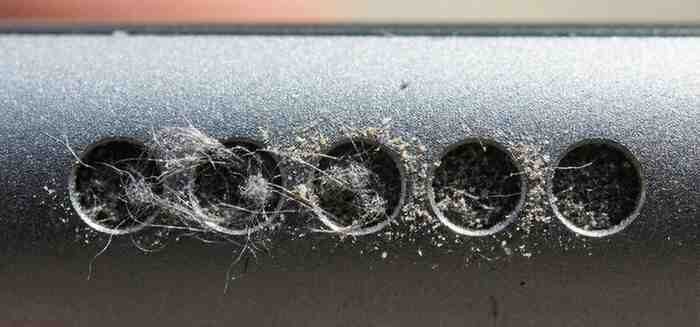
While it stops crumbs, it easily traps:
- Pocket Lint: The number one killer of sound quality.
- Sebum and Oils: Natural oils from your face and hands can create a sticky residue that binds dust to the grill.
- Water: If you’ve dropped your phone in the sink or taken it into the shower, water surface tension can trap liquid inside the mesh, muffling sound instantly.
When these elements combine, they form a “sound barrier.” Cleaning this barrier requires precision. Using the wrong tool can puncture the mesh or destroy the water resistance seal.1
Method 1: The “Sound Ejection” Method (Safest & Easiest)
If you are asking how to clean iPhone speaker without touching it, this is your answer. Mechanical cleaning always carries a slight risk of pushing dirt further in. Sound cleaning uses physics to push dirt out.2
At speakercleaningsound.com, we have developed specialized audio tools that play specific low and high-frequency tones. These tones cause the speaker diaphragm to vibrate intensely. This vibration creates air pressure that literally pushes water droplets and loose dust out of the grill.3
How to Use Speakercleaningsound.com to Clean Your iPhone
- Disconnect Bluetooth: Ensure your phone is not connected to headphones or wireless speakers.
- Max Volume: Turn your iPhone volume all the way up.
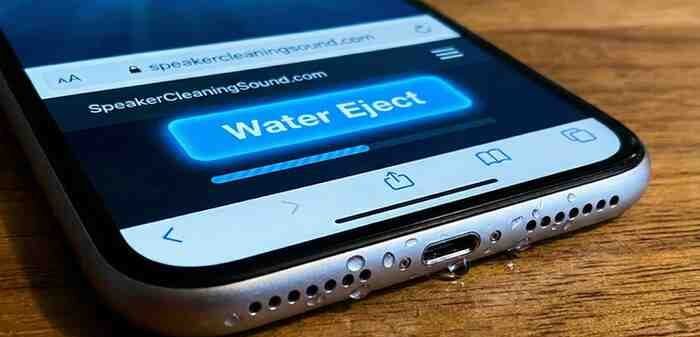
- Visit Our Tool: Go to the [Water Eject / Dust Cleaner Tool] on this site.
- Select Mode:
- For Water: Choose the “Water Eject” mode. This uses a low-frequency hum (around 165Hz) to break water tension.4
- For Dust: Choose the “Dust Cleaner” mode. This uses a sweeping frequency that varies pitch to dislodge dry particles.
- Position the Phone: Lay your iPhone flat on a table, or hold it slightly angled downward so gravity can help the debris fall out.
- Play the Sound: Run the loop for 2-3 minutes. You might actually see small droplets or dust bunnies dance out of the speaker holes!
Why this works best: It is non-invasive. There is zero risk of scratching your phone or damaging the mesh. It is the perfect “first step” before trying any physical scraping.
Method 2: The Soft-Bristle Brush Technique
If the sound method at speakercleaningsound.com loosened the debris but didn’t get it all out, you may need some manual agitation. Apple officially recommends this method.
What you need:
- A clean, dry soft-bristled toothbrush (do not use an old one with toothpaste residue!).5
- Alternatively, a clean painter’s brush or makeup brush.
- Good lighting.
[IMAGE: A hand holding a clean, soft-bristle toothbrush gently scrubbing the bottom speaker ports of an iPhone 15]
Step-by-Step Instructions:
- Remove the Case: Take off any protective case that might block your access to the grills.
- Inspect: Shine a flashlight into the ports to locate the heaviest buildup.6
- Brush Gently: Hold the brush at a slightly angle. Do not press in. Instead, use a flicking motion to brush across and away from the speaker.
- The “Top-Down” Rule: Try to hold the phone so the speaker is facing down. This ensures that dislodged dirt falls onto the floor, not deeper into the phone.
- Test: Open speakercleaningsound.com again and play a test track to see if clarity has improved.
Method 3: The Painter’s Tape Hack
This is a favorite among tech technicians because it lifts dirt without abrasion.
What you need:
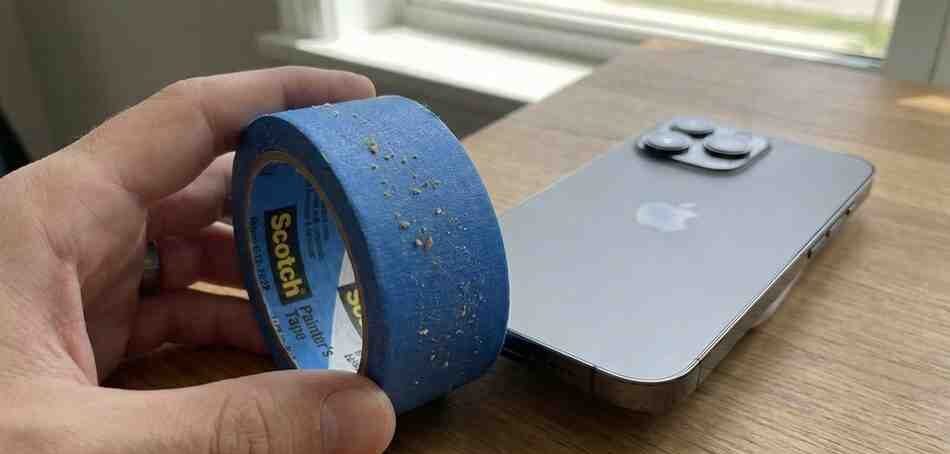
- Blue painter’s tape or masking tape (Do not use duct tape or super sticky packing tape, as they leave residue).7
Step-by-Step Instructions:
- Roll a Cylinder: Tear off a small piece of tape and roll it into a tight cylinder with the sticky side facing out.
- Press and Lift: Gently press the sticky tape into the speaker grill. You want the tape to enter the slight recess of the grill but not force its way in.
- Inspect the Tape: Pull it away and look at the tape. You should see dead skin cells, lint, and dust stuck to the adhesive.
- Repeat: Use a fresh section of tape and repeat until the tape comes away clean.
Pro Tip: This method works exceptionally well for the earpiece speaker (the one at the top of your screen) which is harder to brush.
Method 4: The Air Blower (NOT Compressed Air)
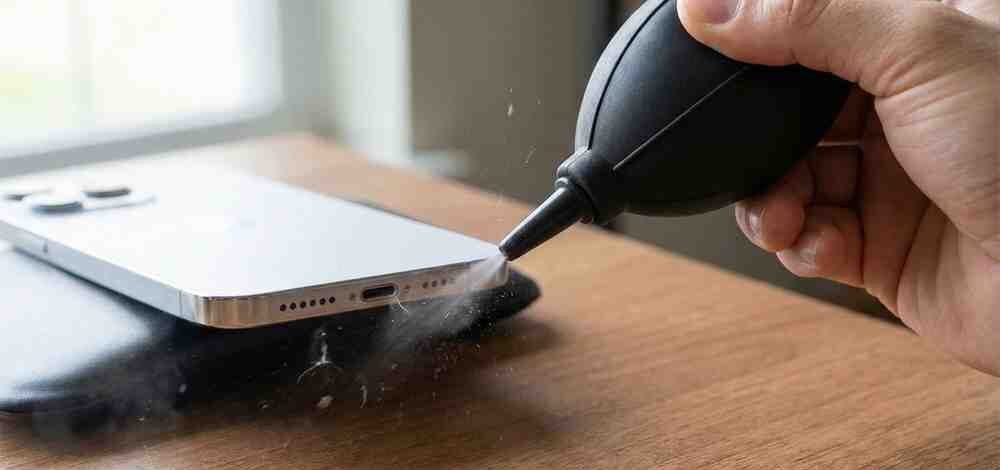
A common myth is that you should use “canned air” or compressed air dusters. Do not do this. The high pressure from canned air can destroy the delicate diaphragms inside your iPhone’s microphone and speaker. It can also blow the water-resistance seals apart.
Instead, use a manual air blower (often used for cleaning camera lenses).8
Step-by-Step Instructions:
- Position the Blower: Hold the nozzle of the manual blower about 1 inch away from the speaker holes.
- Angle It: Do not blow directly straight in. Angle the air so it blows across the opening, creating a vacuum effect (Bernoulli’s principle) that sucks dust out, or blows it sideways.
- Squeeze: Give it a few sharp squeezes.
- Combine: This works best if you alternate between the Soft Brush method and the Air Blower.
Method 5: Using Cleaning Putty / Slime
You may have seen “cleaning slime” or “tech putty” used for car vents and keyboards. This can work for iPhones, but you must be careful.
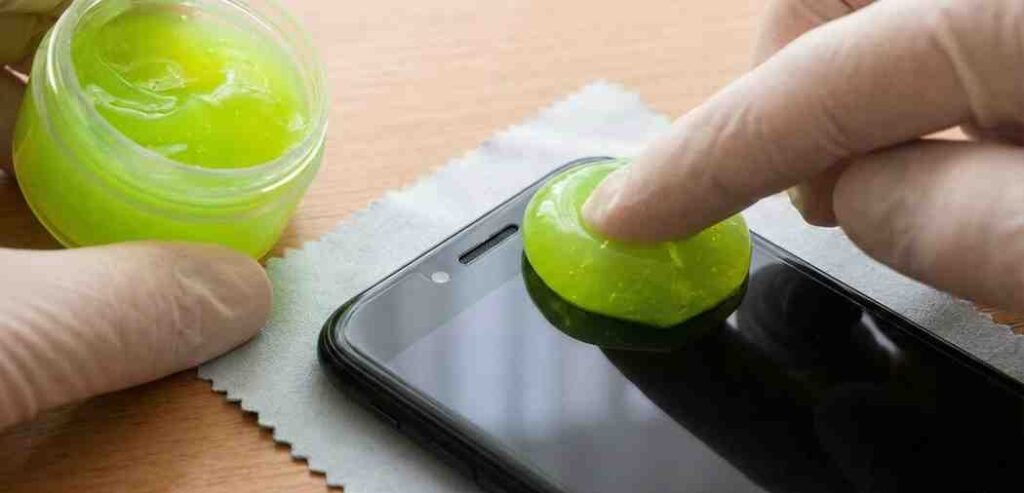
The Risk: If the putty is too warm or runny, bits of it can break off inside the mesh, permanently blocking it.
The Right Way:
- Use high-quality electronics cleaning putty (like CyberClean).
- Ensure the putty is cold/firm, not warm/sticky.
- Press it quickly firmly against the speaker and pull it off effectively. Do not let it “settle” or seep into the holes.
What to Avoid: 4 Dangerous Cleaning Mistakes
When learning how to clean iPhone speaker, knowing what not to do is just as critical. We see many customers at speakercleaningsound.com who tried these “hacks” and ruined their phones.
- ❌ Never Use Needles or Safety Pins: It is tempting to pick the dirt out with a needle. Don’t. The speaker mesh is fragile. One slip and you will puncture the speaker cone, causing permanent static or silence.
- ❌ Never Use Rubbing Alcohol (Liquid): While alcohol cleans glass well, pouring or rubbing liquid alcohol directly on the mesh can dissolve the internal adhesive that creates the water barrier.
- ❌ Never Use Canned Compressed Air: As mentioned above, the PSI is too high.9 It can shatter internal components.
- ❌ Never Use Mouth Blowing: Blowing into the port with your mouth introduces saliva (moisture) into the device, which can corrode the contacts over time.10
Troubleshooting: Is It Dirt or Hardware Failure?
Sometimes, you clean your speaker perfectly using our Speaker Cleaning Sound tools and brushes, but the sound is still low. This suggests a software or hardware issue.
Check Your Settings:
- Sound Check: Go to Settings > Music > EQ and make sure it isn’t set to a setting that lowers volume.
- Volume Limit: Check Settings > Sounds & Haptics > Headphone Safety to ensure you haven’t capped loud sounds.
- Bluetooth: Sometimes your phone is “playing” audio to a Bluetooth device in another room. Turn off Bluetooth to verify.
If the speaker crackles even after cleaning, the speaker component itself may be damaged and require professional repair.
How to Clean Water from iPhone Speaker
If your sound is muffled because you just dropped your phone in water, the physical brushing methods above won’t help. You need to eject the fluid.
![Schematic diagram showing how sound waves push water droplets out of a speaker cavity]](https://speakercleaningsound.com/wp-content/uploads/2026/01/wfg-e1767589860733.jpeg)
Water creates a seal over the mesh. The only way to remove it without opening the phone is vibration.
- Wipe the Exterior: Dry the phone with a lint-free cloth.
- Do Not Charge: Never plug in a wet iPhone.
- Use speakercleaningsound.com: Immediately navigate to our Water Eject Tool.
- Run the Cycle: The low-frequency bass sounds are specifically tuned to break the surface tension of water. You will likely see water bubble out of the grill. Wipe it away as it emerges.
Maintenance: How to Keep Your Speakers Clean
Prevention is better than cure. To avoid having to deep clean your iPhone every month, follow these tips:
- Face Up in Pockets: When putting your phone in your pocket, try to place it with the speaker ports facing up (towards the opening of the pocket) rather than down where the lint accumulates.
- Clean Your Case: Dust often gets trapped between the case and the phone, eventually migrating to the speakers. Wash your phone case with soap and water once a month.
- Regular “Sound” Maintenance: You don’t need to wait for a blockage. Run the speakercleaningsound.com dust cleaner tool once a week for 30 seconds to dislodge micro-dust before it builds up into a hard layer.
Conclusion
A muffled iPhone speaker is annoying, but it is rarely permanent. By following this guide, you can restore your audio to crystal-clear quality in under 5 minutes.
Recap of the best process:
- Step 1: Use speakercleaningsound.com to vibrate loose dust and water out safely.
- Step 2: Use a soft brush to flick away stubborn surface debris.11
- Step 3: Use painter’s tape to lift remaining fine particles.12
Your iPhone is a premium device; treat it with care. Avoid sharp objects and harsh chemicals. Stick to sound, air, and soft bristles.
Frequently Asked Questions (FAQ)
Q: Can I use a toothpick to clean my iPhone speaker?
A: We advise against it. While some people do it successfully, the risk of puncturing the mesh is high. A soft brush is much safer. If you must use a pick, use a plastic dental pick and be incredibly gentle.
Q: Does the “Water Eject” sound actually work?
A: Yes. It is based on the same technology Apple uses in the Apple Watch. The specific frequencies create enough air displacement to push water out of the shallow speaker chamber.13 You can test this yourself at speakercleaningsound.com.
Q: How often should I clean my iPhone speakers?
A: It depends on your environment. If you work in construction or keep your phone in linty pockets, clean it monthly. For average users, a deep clean every 3-4 months is sufficient.
Q: Will cleaning my speakers improve battery life?
A: Indirectly, yes. If your speakers are clogged, you likely turn the volume up to 100% to hear clearly. Cleaning them allows you to listen at 50-70% volume, which consumes less power.
Q: Is speakercleaningsound.com free to use?
A: Yes, our speaker cleaning and water ejection tools are completely free to use directly from your browser.14 No app download is required.